Table of Contents
Manage User Preferences
The ECG Quiz allows users to set preferences to tailor their interactions with The ECG Quiz. The preferences currently defined are described below.
Preferences can be accessed two ways from the menus:
- The ECG Quiz –> Manage Preferences
- My Account –> The ECG Quiz Preferences
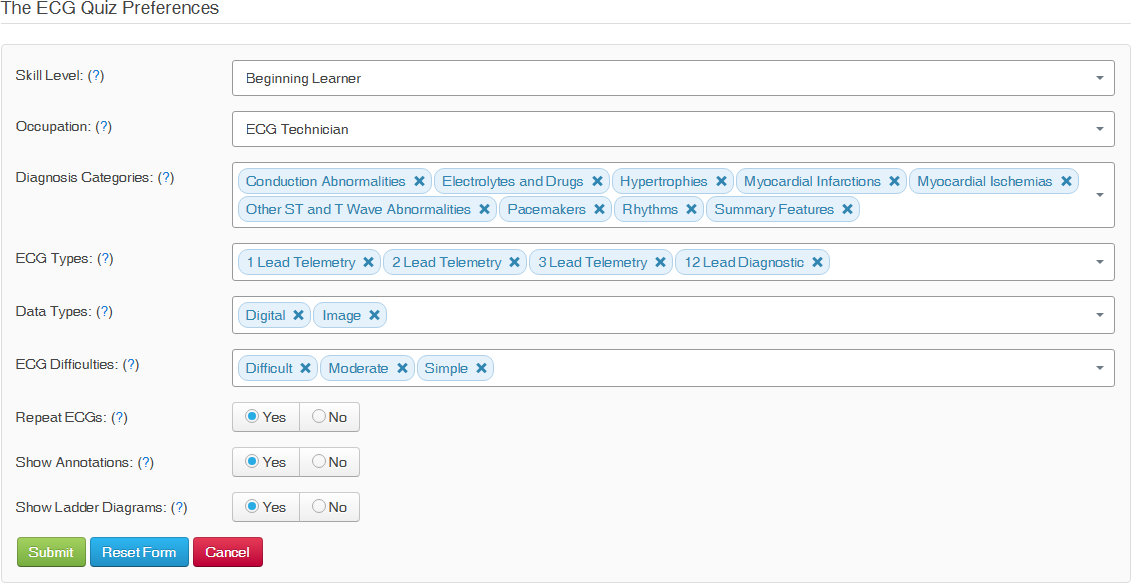
The ECG Quiz User Preferences dialog is shown in Figure 1.
Notice
When you change your Skill Level or Diagnosis Categories, a popup will ask whether you want to archive your current results. Archiving is recommended to preserve your prior performance data for future reference.
Skill Level
Select the skill level at which your answers will be graded by the system. Available Levels of Expertise are:
- Beginning Learner - just learning the basics like tachycardia, bradycardia, pause, etc.
- Intermediate Learner - learning about afib, heart block, ischemia, and VF.
- Advanced Learner - reviewing fast and slow rhythms, acute MI, ischemia, device malfunctions, etc.
Your Skill Level is visible to all users on the Account Preferences tab on your Public Profile.
Occupation
Select the occupation that best fits your occupation, or contact us if your occupation is not on the list.
Your Occupation is visible to all users on the Account Preferences tab on your Public Profile.
Diagnosis Categories
Select the diagnosis categories to use to grade your interpretation. Available Diagnosis Categories are:
- Conduction Abnormalities
- Electrolytes and Drugs
- Hypertrophies
- Myocardial Infarctions
- Myocardial Ischemias
- Other ST and T Wave Abnormalities
- Pacemakers
- Rhythms
- Summary Features
Notice
Only Subscribers and Organization Members can modify the following Preferences.
ECG Types
Select the types of ECGs you want to have included when a random ECG is selected for you to analyze. Available ECG Types are:
- 12 Lead Diagnostic
- 1 Lead Telemetry
- 2 Lead Telemetry
- 3 Lead Telemetry
File Types
Select the file types of ECGs you want to have included when a random ECG is selected for you to analyze. Available file types are:
- binary data
- images
ECG Difficulties
Select the difficulty of ECGs you want to have included when a random ECG is selected for you to analyze. Available difficulties are:
- Simple
- Moderate
- Difficult
Repeat ECGs
Select whether or not you want the system to repeat ECGs when randomly selecting ECGs for you to analyze. The available options are:
- Yes - allow the system to randomly select ECGs from all ECGs in the database
- No - allow the system to randomly select ECGs from all ECGs in the database that you have not already analyzed
Show Annotations
Select whether or not you want the system to display ECG Annotations automatically if they exist for the ECG. The available options are:
- Yes - automatically show ECG Annotations
- No - do not automatically show ECG Annotations
Show Ladder Diagrams
Select whether or not you want the system to display Ladder Diagrams automatically if they exist for the ECG. The available options are:
- Yes - automatically show Ladder Diagrams
- No - do not automatically show Ladder Diagrams